Summary: Every AI backend needs the same thing: run a model when data arrives, keep results in sync, serve them without glue. Most teams bolt this on with orchestrators, queues, and cron jobs. Pixeltable is the only backend where AI transformations are part of the schema, not bolted on top. That single design decision eliminates entire categories of bugs, drift, and operational overhead. This post explains the difference, why it matters, and what it looks like in practice.
The "Bolted-On" World#
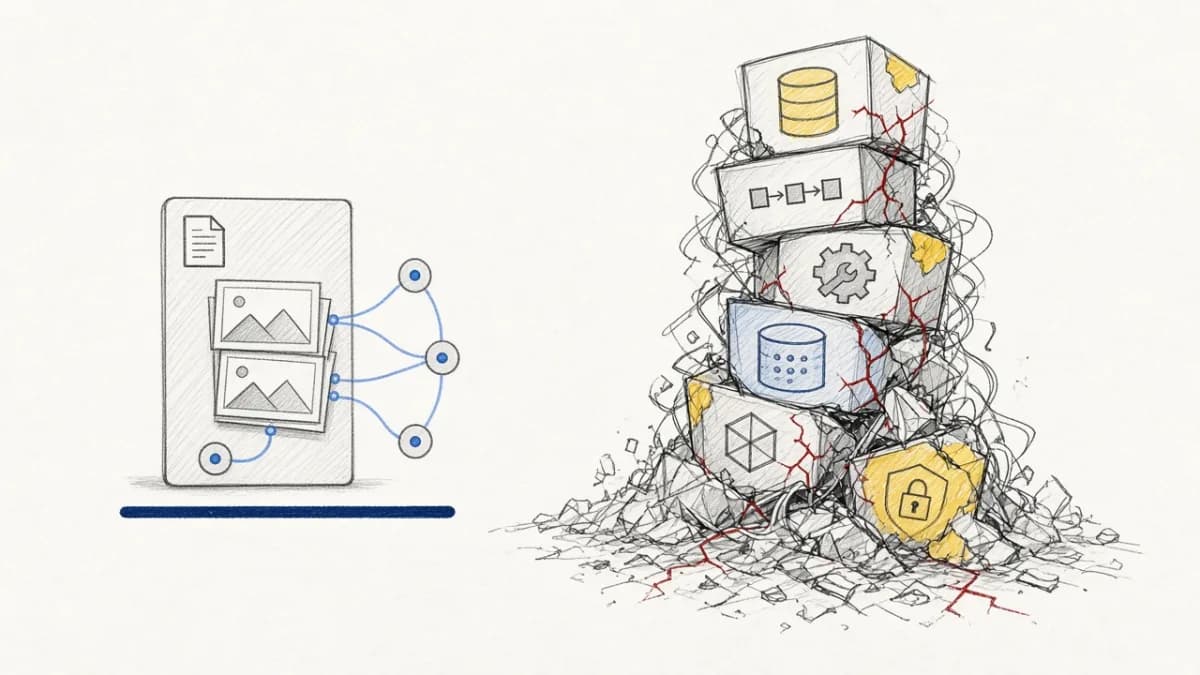
Here is how most AI backends work today. You have a database for storage. Somewhere else, you have a script or DAG that reads from that database, calls an LLM, and writes results back. Somewhere else again, you have an embedding pipeline that reads text, calls an embedding model, and pushes vectors to a separate vector database. A cron job or event trigger connects them.
The schema says: "this table has a column called text." The AI transformation ("summarize this text with GPT-4o") lives somewhere else entirely: an Airflow DAG, a Lambda function, a LangChain chain, a notebook someone runs manually.
This creates three problems that compound over time:
1. Drift Between Schema and Logic#
The database schema and the AI logic are separate artifacts maintained by separate processes. Add a column to the table? The DAG doesn't know about it. Change a prompt? The database doesn't know it happened. Rename a field? Something breaks at 3 AM. There is no single source of truth that says "when data enters this table, this model runs on it."
2. Manual Sync Obligations#
When the embedding model changes, who recomputes the vectors? When a row gets updated, who re-runs the summarizer? When a new column is added that depends on an existing computed result, who wires the dependency? In the bolted-on world, the answer is always "you, manually." You write migration scripts, backfill jobs, and dependency trackers. You become the orchestrator.
3. Partial States and Silent Failures#
The pipeline ran on 10,000 rows but failed on 47 of them due to rate limits. Which 47? The database doesn't know. The DAG logged it somewhere. Maybe. The embedding index has vectors for 9,953 documents but the table has 10,000 rows. Nobody notices until retrieval quality degrades. In a bolted-on system, partial states are the default, and consistency is an aspiration.
What "In the Schema" Actually Means#
Pixeltable takes a different approach. AI transformations are declared as computed columns inside the table definition itself. The schema doesn't just describe storage; it describes computation.
After these three declarations, the table is an AI pipeline. Insert a row with a text value and the system automatically:
- Calls GPT-4o-mini to generate a summary
- Computes an embedding of the text
- Updates the vector index
- Tracks the dependency graph so downstream consumers stay consistent
No external trigger. No cron job. No event bus. The schema is the orchestration.
Why This Distinction Matters#
Putting AI in the schema is not just a syntactic convenience. It changes the invariants the system can enforce.
Consistency by Construction#
In a bolted-on system, consistency between raw data and derived data is a property you have to verify externally ("did every row get processed?"). In Pixeltable, it is a property the system guarantees. Every row that exists in the table has had its computed columns evaluated, or has a tracked error explaining why not. There is no "some rows were processed" state.
Failed cells are queryable at the column level. You don't grep log files; you query the table.
Incremental by Default#
Because the system knows which columns depend on which inputs, it can do incremental recomputation automatically. This is Incremental View Maintenance (IVM) applied to AI, not just SQL.
- Insert 100 new rows and only those 100 rows flow through the computed columns. Existing results are untouched.
- Change the prompt in a computed column definition (drop and recreate it) and only the affected column recomputes. Other computed columns that don't depend on it stay cached.
- Swap an embedding model and the vector index rebuilds incrementally. Downstream similarity search immediately uses the new embeddings.
In a bolted-on world, changing a prompt means: write a migration, backfill every row, hope nothing else broke. In Pixeltable, you redefine the column and walk away.
Dependency Tracking Without DAGs#
Computed columns form a dependency graph implicitly. If column B depends on column A, and you update A, B recomputes. If column C depends on B, it recomputes too. The cascade is automatic and tracked.
You don't write a DAG. You don't configure task dependencies. You don't set up Airflow. The schema is the DAG, and the runtime handles execution order, parallelism, retries, and rate limiting.
Versioned by Default#
Every mutation to a Pixeltable table is versioned. You can time-travel to any previous state, compare outputs across model versions, or roll back a bad prompt change. The bolted-on approach has no equivalent. Once your Airflow DAG overwrites the summary column in Postgres, the previous values are gone unless you built a versioning system yourself.
UDFs: Your Logic, Same Guarantees#
Computed columns are not limited to built-in AI provider calls. Any Python function decorated with @pxt.udf becomes a first-class schema citizen with the same consistency, incrementality, and error-tracking guarantees.
The function runs on every insert, retries on transient failure, and tracks errors per-cell. It participates in the dependency graph exactly like a built-in provider call. You write the logic; the system handles orchestration.
Bolted-On vs. In-the-Schema: Side by Side#
| Bolted-On (Airflow + LangChain + Vector DB) | In-the-Schema (Pixeltable) | |
|---|---|---|
| Where AI logic lives | DAG files, Lambda functions, scripts | Table schema (computed columns) |
| Trigger mechanism | Cron, event bus, manual run | Automatic on insert/update |
| Consistency guarantee | Best-effort (check logs) | By construction (query errors) |
| Incremental recompute | Write it yourself | Automatic (IVM) |
| Dependency tracking | DAG definition (manual) | Column dependency graph (automatic) |
| Error tracking | Log files, monitoring dashboards | Per-cell queryable errors |
| Versioning | Build it yourself (DVC, MLflow) | Built-in time travel |
| Model swap | Edit DAG, write backfill, run migration | Drop column, recreate, walk away |
| New column depending on AI output | Edit DAG, add task, wire dependency | One line: add_computed_column() |
| Serving | Write FastAPI routes manually | FastAPIRouter derives endpoints from schema |
Serving Completes the Picture#
Because AI transformations live in the schema, serving them is trivial. The FastAPIRouter reads the schema and generates HTTP endpoints. No separate API layer. No query duplication.
The insert route triggers all computed columns automatically. The query route serves similarity search over always-in-sync embeddings. The schema declared it all; the router just exposes it over HTTP.
What Changes When AI Is in the Schema#
Teams that move AI transformations into the schema report the same pattern: entire categories of work disappear.
- No sync scripts. The schema guarantees consistency between raw and derived data.
- No backfill jobs. Incremental recomputation handles model swaps automatically.
- No pipeline debugging. Errors are per-cell and queryable, not buried in logs.
- No glue code. Storage, computation, indexing, and serving are one system.
- No "works in notebook, breaks in production." The same schema runs locally and at scale.
The PixelAssist retrospective quantified this: 2,100 lines of TypeScript backend replaced by approximately 40 lines of Pixeltable schema. Not because Pixeltable is more terse, but because the TypeScript version was mostly sync logic, error handling, and orchestration that Pixeltable handles by construction.
Try It#
The fastest way to see schema-level AI in action:
The generated schema.py defines tables, computed columns, embedding indexes, and API routes in one file. Insert a document, and the entire pipeline fires. No infrastructure to configure. No services to start. The schema is the infrastructure.
Further Reading#
- Schema-Driven Infrastructure: What Vercel Did for Frontends, Pixeltable Does for AI
- The Economics of Incremental AI: Stopping the Re-computation Cash Burn
- Dependency Graph Magic: How Pixeltable Keeps Your AI Pipeline Data Consistent
- Deconstructing the AI Frankenstein Stack: The Hidden Cost of Glue Code
- Pixeltable's Time Travel: Advanced Versioning for Fearless AI Development
- Five Things Pixeltable Does That No Combination of LangChain, Pinecone, and Airflow Can
- PixelAssist Retrospective: 2,100 Lines of TypeScript vs. 40 Lines of Pixeltable
- Pixeltable vs Airflow for ML Orchestration: Declarative AI vs Workflow DAGs
- Pixeltable vs LangChain for RAG Systems: Comprehensive Comparison
- Iterate on Your Data, Not Your Infrastructure
- Unlock Custom AI Workflows: Mastering Python UDFs in Pixeltable
- Pixeltable Documentation